 OnceBefore
11 · Manual
Privacy review before sharing
Create a reviewed derivative for the recipient instead of exposing private originals.
Steps
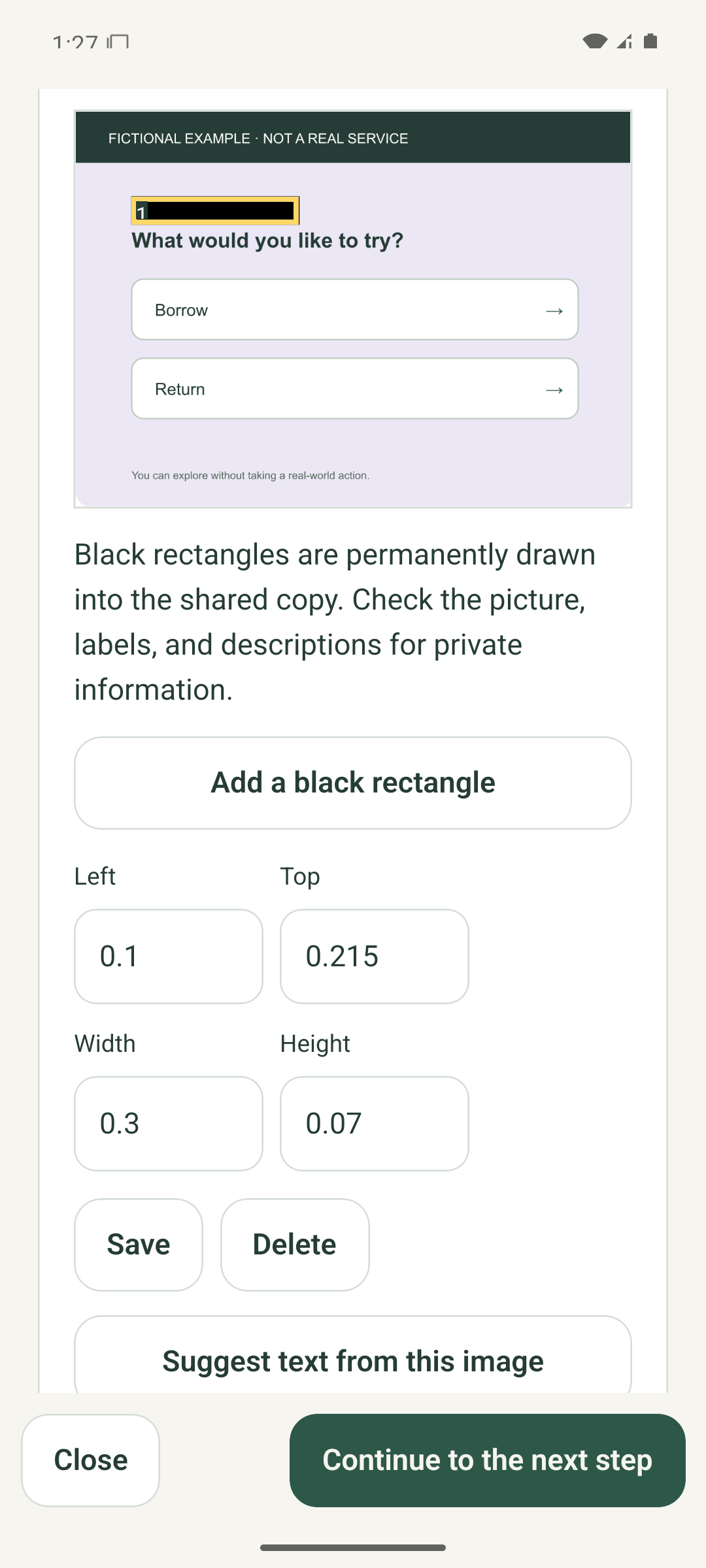
- Use Hide private information to draw black rectangles over sensitive details in image material.
- Review labels, scene descriptions, source names, choices, transcripts, captions, and audio separately. A visual mask does not inspect them.
- For moving video, play the entire rendered preview and make sure sensitive details remain covered in every frame.
- Open Preview recipient copy and traverse every route with the exact material the recipient will receive.
- Confirm I checked the recipient preview and that you have the right to share the material before making a file.
What to expect
The shareable practice uses reviewed derivatives. Private originals, edit history, personal notes, progress, and app settings are excluded.
If it does not work
- If you cannot verify a moving mask, use more masks, remove the sound, shorten the clip, or use still scenes.
- If material, masks, captions, translations, choices, or audio change, repeat the relevant review.
- Cancel file creation if anything is uncertain. The saved project and originals remain.
Keep in mind
Masking reduces visible exposure but is not a guarantee that a file contains no personal or sensitive information. In the example image, the yellow numbered outline belongs to the editor and is not part of the recipient derivative.